Yipyap: Injecting Playful Energy into Design Projects
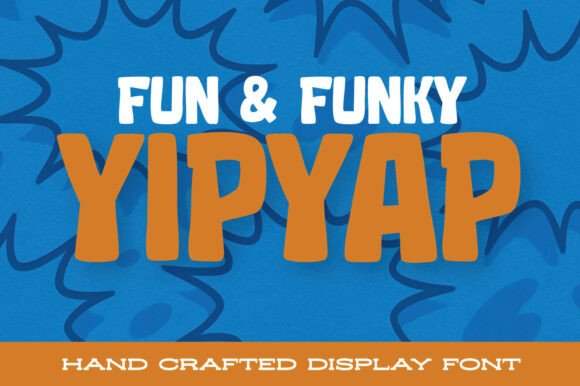
Typography plays a crucial role in shaping the tone and personality of a design. Yipyap, a bouncy, cartoony, and super-chunky display font, brings a fresh, animated energy to creative work. Each letter is soft, rounded, and delightfully uneven, giving the typeface a hand-drawn, whimsical feel. Whether you're designing a children's book, packaging for a quirky snack brand, or a comic-style logo, Yipyap offers a fun, expressive option that stands out without being overwhelming.
Understanding Yipyap in the Broader Design Workflow
In most creative workflows, typography is selected early in the design process to ensure visual consistency. Yipyap fits best in projects where personality and playfulness are core to the message. Unlike more neutral fonts used for body text or formal branding, Yipyap shines as a display typeface. This makes it ideal for titles, logos, stickers, and other visual elements that need to grab attention and evoke a sense of fun.
Because of its bold and distinctive character shapes, Yipyap is best used sparingly. It works well as a headline font or for short bursts of text rather than extended reading. Designers should consider this when integrating it into their workflow—reserving it for moments where visual impact is more important than readability over long passages.
Using Yipyap Before, During, and After a Creative Project
Before starting a project, it's helpful to define the tone and audience. If the goal is to create something lighthearted, youthful, or humorous, Yipyap can be a strong contender from the outset. During the concept phase, testing Yipyap in mockups or mood boards helps determine if it aligns with the intended emotional response.
During the design process, Yipyap can be used to highlight key elements such as character names in a comic, product names on packaging, or chapter titles in a children's book. Its exaggerated weight and rounded edges make it especially effective in illustrations or designs that already have a cartoonish or animated style.
After completing a project, designers may revisit their font choices to assess how well they supported the overall vision. In cases where Yipyap was used for branding or packaging, it may become part of a long-term style guide—ensuring consistency across future materials.
How Yipyap Works with Other Tools and Platforms
Yipyap integrates seamlessly with most modern design tools including Adobe Illustrator, Photoshop, Figma, Canva, and Procreate. When working in vector-based programs, the font retains its crisp edges and bold presence, making it ideal for logos and scalable graphics. In raster-based environments, it's important to consider resolution to maintain clarity, especially when used at larger sizes.
For web designers, Yipyap can be embedded using services like Google Fonts or Adobe Fonts, though it's important to test performance and rendering across browsers. Because it's a decorative font, it's best used for headings or visual accents rather than body text. Pairing Yipyap with a clean, sans-serif font like Montserrat or Open Sans helps balance the design and improve readability.
When collaborating with other creatives or clients, it's a good practice to embed or convert Yipyap text to outlines when exporting files. This ensures that the font appears consistently across different systems and avoids potential substitution issues.
Practical Implementation Tips for Using Yipyap
- Use Yipyap for short text – It’s most effective in headlines, titles, and labels where visual impact is key.
- Pair with complementary fonts – Balance the boldness of Yipyap by pairing it with simpler fonts for body text or secondary elements.
- Test at different sizes – While Yipyap looks great large, it may lose clarity at very small sizes due to its thick strokes and rounded edges.
- Convert to outlines before final export – This prevents font substitution issues when sharing files with others who may not have Yipyap installed.
- Experiment with color and texture – Yipyap’s playful nature pairs well with bright colors, gradients, and even textured fills to enhance its cartoon-like appeal.
Workflow Examples Featuring Yipyap
Consider a small business owner launching a new line of organic fruit snacks for kids. The branding needs to feel fun, approachable, and energetic. During the initial branding phase, the designer selects Yipyap for the product name and packaging tags. They pair it with a clean, sans-serif font for nutritional information and ingredients to maintain legibility.
In another scenario, a freelance illustrator works on a children's book. They use Yipyap for character dialogue and chapter titles, adjusting letter spacing and color to match the story's tone. The font’s hand-drawn appearance complements the book's illustrations, creating a cohesive visual style.
A graphic designer working on a sticker brand for teens selects Yipyap to create bold, eye-catching phrases. They layer the font with gradients and subtle shadows to give the stickers a dimensional look, ensuring they stand out both online and in physical stores.
Long-Term Use and Consistency
For brands or creators who adopt Yipyap as part of their visual identity, maintaining consistency is key. This includes setting usage guidelines for font size, spacing, color variations, and acceptable applications. Storing these guidelines in a shared brand asset folder ensures that all team members or collaborators use the font correctly over time.
Designers should also consider licensing when using Yipyap in commercial projects. Most font platforms offer different licenses depending on the use case—whether for print, web, or product packaging. Ensuring proper licensing avoids legal issues and supports the type designers behind the font.
Conclusion: Making Yipyap a Natural Part of Your Design Toolkit
Yipyap is more than just a novelty font—it's a design tool that adds character and charm to the right kind of projects. By understanding where and how it fits into your workflow, you can make intentional design choices that enhance your message rather than distract from it. Whether you're a marketer, educator, small business owner, or creative professional, Yipyap offers a fun, flexible option for adding personality to your visual communications.
When used thoughtfully and paired with complementary design elements, Yipyap becomes a memorable part of your creative output. As with any design tool, the key is to match its strengths to the needs of your project—ensuring that every use of Yipyap feels purposeful, polished, and perfectly playful.