Wonky Dongki: A Playful Display Font for Lighthearted Design Projects
Understanding Wonky Dongki in the Design Workflow
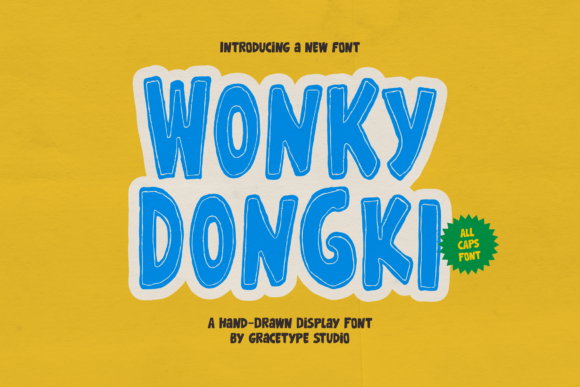
Wonky Dongki is a hand-drawn display font designed to bring a sense of fun and spontaneity to visual projects. Its all-caps structure, uneven letterforms, and charming border give it a distinctive look that mimics hand-lettered signs or cartoon-style typography. While many fonts aim for precision and uniformity, Wonky Dongki embraces irregularity — making it ideal for designers who want to convey a sense of authenticity and lightheartedness.
From a workflow perspective, Wonky Dongki fits best in the visual ideation and branding phases of a project. Whether you're designing a children's book, a product label, or a social media graphic, this font can act as a stylistic anchor that informs the tone of the entire piece. It's particularly useful when you want to break away from conventional design aesthetics and inject a sense of playfulness without sacrificing readability.
Integrating Wonky Dongki into Real-World Projects
When planning a creative project, font choice often comes early in the design process. Wonky Dongki works well as a headline or title font due to its bold and attention-grabbing nature. It’s not meant for long blocks of text but shines when used for short, impactful phrases. This makes it ideal for:
- Children’s book covers and illustrations
- Merchandise branding for playful or quirky brands
- Event invitations with a casual, fun vibe
- Social media posts that need to stand out
- Posters and flyers for entertainment or educational events
Before incorporating Wonky Dongki into a project, consider how it aligns with the overall brand or message. For example, if you're designing a logo for a toy store or a summer camp, this font can help reinforce a sense of joy and approachability. However, it may not be appropriate for formal or corporate settings where clarity and professionalism are the priority.
Compatibility and Usability Considerations
Wonky Dongki is PUA-encoded, which means it supports a wide range of glyphs, swashes, and alternate characters. This feature allows designers to customize letterforms for visual interest without needing additional tools or software. For users working in Adobe Creative Cloud, Figma, Canva, or other design platforms, the font integrates smoothly, enabling quick experimentation with different stylistic variations.
When using Wonky Dongki, it’s important to test legibility across different mediums. While it performs well in digital formats, especially at larger sizes, it may require adjustments when used in print or at smaller scales. Kerning and spacing should be checked carefully, particularly when combining it with more structured sans-serif or serif fonts for body text.
Practical Workflow Tips for Using Wonky Dongki
Incorporating Wonky Dongki into your design workflow can be both efficient and enjoyable if approached thoughtfully. Here are a few practical tips to help you make the most of this font:
- Pair it with clean, simple fonts: To maintain visual balance, use Wonky Dongki for headlines and pair it with a minimalist font like Montserrat or Open Sans for supporting text.
- Use it in mockups to test tone: Before finalizing a design, create a quick mockup using Wonky Dongki to see how it affects the overall mood of the project.
- Customize with alternate glyphs: Explore the font’s alternate characters to add subtle variety and avoid repetition in repeated letterforms.
- Export and share with collaborators: If you're working in a team environment, ensure all collaborators have access to the same font version to avoid display inconsistencies.
Wonky Dongki also pairs well with illustration styles that lean toward the hand-drawn or whimsical. If your project includes custom icons or vector illustrations, aligning their visual style with the font can create a cohesive and engaging design language.
Long-Term Use and Consistency
While Wonky Dongki is a powerful tool for one-off projects, it can also be part of a long-term brand identity strategy — especially for brands that emphasize personality and fun. If you're considering using it across multiple campaigns or assets, establish clear guidelines for its use. This includes rules for size, spacing, color combinations, and acceptable use cases.
Consistency is key when using a distinctive font like Wonky Dongki. Overuse can dilute its impact, so reserve it for moments where visual emphasis is needed. For example, use it for promotional headers or key callouts rather than every headline across your website or marketing materials.
Planning and Preparation for Wonky Dongki Integration
As with any design asset, integrating Wonky Dongki into your workflow starts with planning. Before downloading or purchasing the font, consider the following:
- What is the primary use case for this font?
- Do I have the necessary tools to fully utilize its features (e.g., software that supports PUA encoding)?
- Will this font support the overall tone of the project, or is it a stylistic risk?
Once you've determined that Wonky Dongki fits your needs, the next step is to download and install it. Most font platforms offer trial versions, allowing you to test its appearance in your designs before committing. This trial phase is especially useful when evaluating how the font interacts with other design elements like color, layout, and imagery.
Conclusion: Making Wonky Dongki Work for You
Wonky Dongki isn't just a font — it's a design tool that brings personality and charm to any visual project. Whether you're a freelancer working on a client’s branding, a small business owner creating social media content, or an educator designing engaging learning materials, this font offers a way to communicate joy and creativity without overcomplicating the process.
By understanding how Wonky Dongki fits into your design workflow, testing its compatibility with other tools, and planning for consistent use, you can make the most of its unique character. When used thoughtfully, it becomes more than a stylistic choice — it becomes a key part of your visual storytelling toolkit.