Hotdog: Adding Playful Elegance to Your Design Workflow
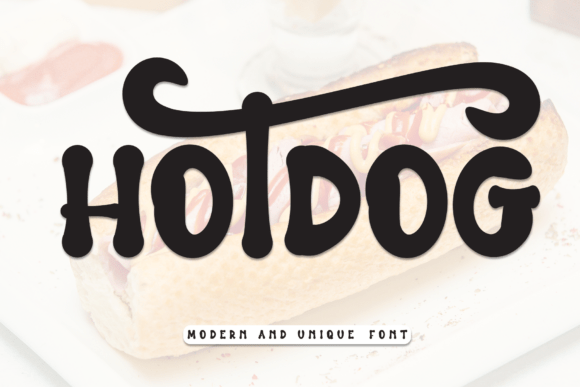
Typography plays a pivotal role in shaping the tone and personality of any design project. Among the many fonts available to modern designers, Hotdog stands out as a unique handwritten display font that effortlessly blends sweetness with friendliness. Whether you're crafting wedding invitations, greeting cards, or digital assets, Hotdog brings a distinctive charm that elevates your work without compromising professionalism.
Understanding Hotdog in the Broader Design Process
Before diving into implementation, it's important to understand where Hotdog fits within a broader creative workflow. Unlike standard serif or sans-serif fonts used for body text, Hotdog is designed for impact. Its handwritten aesthetic makes it ideal for headlines, titles, and short bursts of text where personality and visual appeal matter most.
Designers often reserve display fonts like Hotdog for specific stages of a project—usually after establishing layout structure and hierarchy. This ensures that the font's playful nature enhances the design rather than overwhelms it.
Pre-Project Considerations
Before incorporating Hotdog into your project, evaluate the overall tone and audience of your design. Is the project meant to feel elegant, whimsical, or heartfelt? Hotdog excels in environments where warmth and approachability are key. It’s especially effective for:
- Wedding and event invitations
- Children’s book layouts and illustrations
- Brand assets for boutique businesses
- Social media graphics and digital marketing
Integrating Hotdog into Your Creative Workflow
Once you've determined that Hotdog aligns with your project’s emotional tone, it's time to integrate it effectively into your design process. Here are some practical ways to use it at different stages:
Early-Stage Planning and Mockups
During the planning phase, use Hotdog sparingly in mockups to visualize how it interacts with other design elements. Since it's a display font, it works best when contrasted with simpler, more legible fonts for body text. Consider pairing it with a clean sans-serif or a minimalist script to maintain balance.
Tools like Adobe XD, Figma, or Canva allow you to test different font combinations quickly. This helps ensure that Hotdog enhances the design without causing readability issues later.
Mid-Project Implementation
As you move into the execution phase, apply Hotdog to key design elements such as headers, logos, or call-to-action buttons. It’s especially effective in print media like greeting cards or packaging, where a handwritten touch adds authenticity and charm.
For digital projects, be mindful of file formats and export settings. If you're embedding the font on a website, ensure it's web-optimized or convert it to a vector graphic where necessary to preserve quality across devices.
Post-Production and Review
After applying Hotdog to your design, review it in context. Print a sample or view it on multiple screens to assess legibility and aesthetic balance. If the font feels too dominant, consider reducing its size or adjusting the surrounding elements to create visual harmony.
This stage is also an opportunity to gather feedback. Share the design with colleagues or clients and observe how they perceive the tone. The goal is to ensure that the playful nature of Hotdog aligns with the intended message.
Compatibility and Workflow Efficiency
One of the strengths of Hotdog is its versatility across platforms and tools. Whether you're working in Adobe Illustrator, Photoshop, InDesign, or online design suites like Canva or Figma, the font integrates smoothly. Most modern design software supports OpenType features, allowing you to access ligatures or stylistic alternates if available.
When collaborating with others, ensure that all team members have access to the font or embed it properly in shared files. This prevents inconsistencies and maintains design integrity throughout the workflow.
Long-Term Use and Consistency
For businesses or creators who use Hotdog as part of their brand identity, consistency is key. Establish clear guidelines for when and how the font should be used across different materials. This includes specifying appropriate font sizes, color pairings, and usage scenarios to maintain a cohesive visual language.
Consider archiving design templates that incorporate Hotdog for future use. This streamlines repetitive tasks and ensures that new materials remain aligned with your established brand tone.
Practical Tips for Using Hotdog
Here are a few actionable tips to help you make the most of Hotdog in your workflow:
- Use it for short text: Hotdog shines in headlines, quotes, and captions—not long paragraphs.
- Pair with complementary fonts: Combine it with clean, modern sans-serif fonts like Montserrat or Lato for a balanced look.
- Test in multiple formats: Print a sample or view it on a mobile screen to ensure legibility.
- Maintain brand alignment: If used in branding, document its application in your style guide.
- Keep file compatibility in check: Embed or convert the font when sharing files to avoid typeface mismatches.
Hotdog in Real-World Applications
Let’s explore a few real-world examples of how Hotdog can enhance your creative output:
Wedding Invitations
Wedding stationery benefits greatly from the warmth and elegance of handwritten fonts. Hotdog adds a personal, intimate feel to names, dates, and venue details. Paired with minimalist floral graphics or soft pastel tones, it creates a cohesive and romantic aesthetic.
Product Packaging
Small businesses and independent brands often use Hotdog to give their product labels and packaging a handcrafted look. Whether it's for artisanal food products or boutique cosmetics, the font helps communicate authenticity and care in the brand’s story.
Digital Marketing
In social media graphics and email campaigns, Hotdog can draw attention to key messages or promotions. Its playful nature makes it ideal for seasonal campaigns, limited-time offers, or community-focused content that aims to feel more personable.
Conclusion: Making Hotdog a Natural Part of Your Workflow
Incorporating Hotdog into your design process doesn’t require a complete overhaul of your workflow—it simply adds a layer of warmth and personality where it’s needed most. By understanding its role in the broader creative process, planning its use strategically, and integrating it with complementary tools and assets, you can enhance your designs while maintaining professionalism and clarity.
Whether you're a freelance designer, small business owner, or marketing professional, Hotdog offers a versatile and expressive option for bringing a touch of handwritten charm to your visual communication. The key is to use it thoughtfully, ensuring it supports your message rather than overshadows it.